Table of content

This surface area calculator lets you find surface area for popular 3D shapes in seconds. Enter the dimensions, pick units, and get total surface area (and lateral area when available). Use it as a surface area finder for homework, DIY planning, packaging, and design checks.
Before you start, grab the measurements you already have (or measure the shape with a ruler or tape). Make sure all your numbers use the same unit, like cm or inches, so the result comes out clean and consistent.
Choose a 3D shape from the surface area calculator menu (cube, cylinder, sphere, and more).
Type in the measurements the shape needs (for example: radius, height, length, width).
Pick the unit you’re using, like mm, cm, m, in, or ft.
Hit Calculate to get the surface area right away (and lateral area too, if the shape supports it).
Change the rounding or units if you want a cleaner number for homework or real-life estimates.
After you get your result, double-check whether you need total surface area (everything on the outside) or lateral area (the sides only). If you’re using the number for materials like paint, paper, or wrap, add a little extra for overlap, cuts, and waste.

This surface area calculator is built for the most common 3D shapes you’ll see in school problems and everyday projects. Pick a shape, enter your measurements, and the tool returns the surface area values that match what most worksheets and real-life estimates ask for.
Total surface area
The full outside area of the shape, including every face or curved section. This is the number you’ll use most often when you need the “entire exterior” covered.
Lateral surface area
The side area only (no top or bottom). This shows up a lot with shapes like cylinders and cones, where you may only need the wrap-around surface.
Base area
The area of the bottom face (or one base). It’s useful for checking work, splitting a problem into parts, or when a question asks for “one base” separately.
Unit-consistent outputs
The calculator keeps units consistent automatically: if you enter lengths in cm, your result comes out in cm². Same idea for m → m², in → in², ft → ft².
Optional breakdown by faces
For shapes with flat faces (like prisms and pyramids), you can show a clearer breakdown such as top + bottom + sides, which makes it easier to see where the final total comes from.
After you press Calculate, you’ll see one or more results depending on the shape you picked. Here’s what each number means, so you can match it to your homework question or real-life task.
Total surface area
The full outside area of the 3D shape. It includes every flat face and any curved surface. If a question says “find the surface area,” this is usually the value it wants.
Lateral area
The side surface only. It does not include the top or bottom faces. This is common for shapes like cylinders, cones, prisms, and pyramids when the problem focuses on the “wrap-around” part.
Base area
The area of the bottom face (or one base). For prisms, it’s the area of one of the matching end faces. This is useful when you need surface area in parts, or when a problem asks for a base separately.
Units matter
Surface area uses squared units. If your input is in meters, the answer will be in m². If your input is in feet, the answer will be in ft². Mixing units (like cm and m in the same entry) can throw the result off.
Rounding
If you choose to round to 2 decimals, small differences are normal—especially for shapes that use π (circles), like spheres, cylinders, and cones. For schoolwork, follow the rounding rule your teacher or worksheet uses.
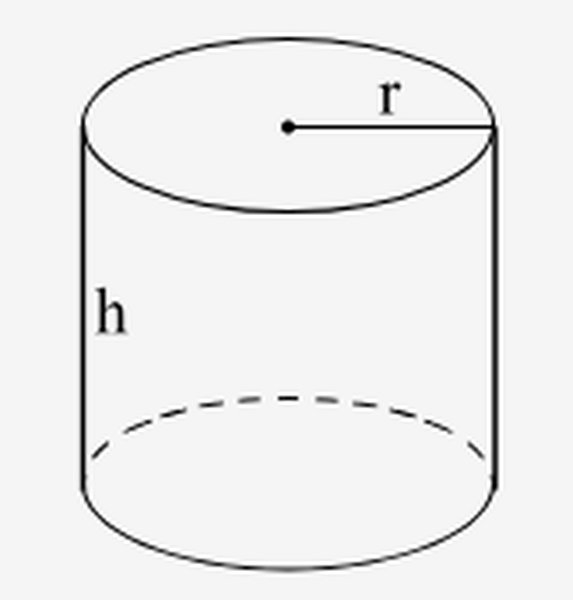
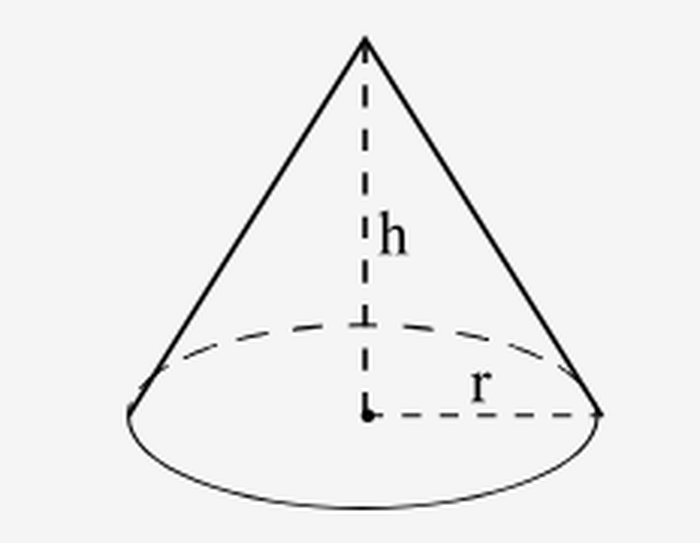
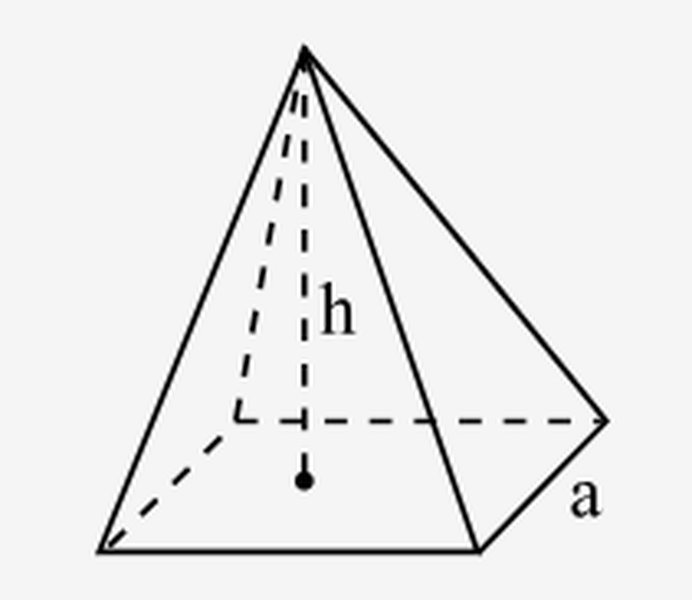
Below are the formulas the surface area calculator uses, plus a quick note for each shape so it’s clear what the result includes. Keep an eye on the symbols: r is radius, h is vertical height, and l is slant height (the diagonal side length on a cone or pyramid face).
|
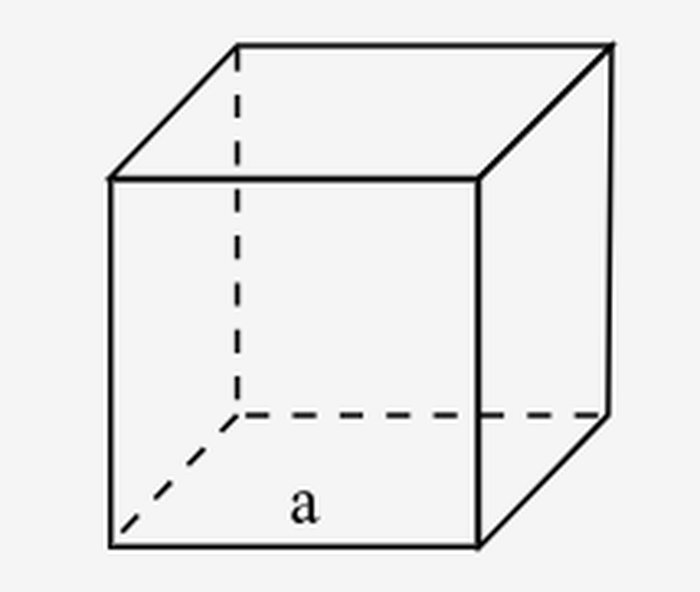
A cube has 6 identical square faces. Since each face is a², the total surface area is just that repeated 6 times. Total surface area: |
 |
|
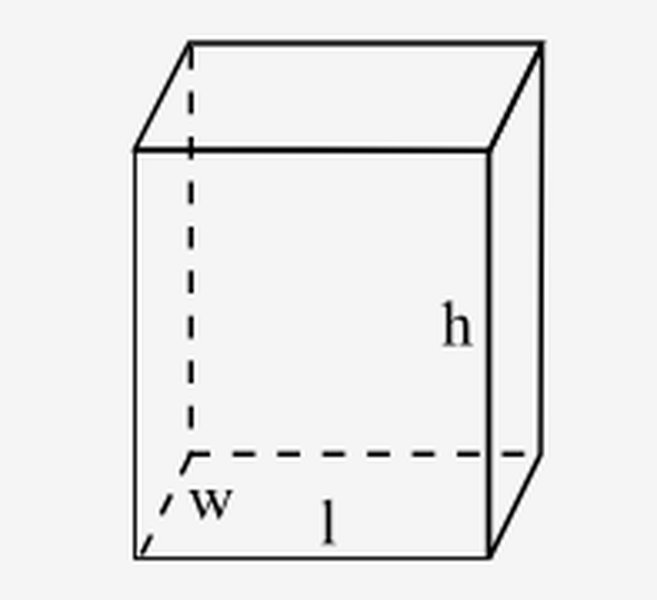
A rectangular prism has 3 pairs of matching rectangles: top/bottom (lw), front/back (lh), and left/right (wh). Add those three areas and multiply by 2. Total surface area: |
 |
|
A cylinder’s surface is made of two circles (top and bottom) plus one wrapped side. The wrapped side is the same as a rectangle with width 2πr and height h.
|
 |
|
A cone has one circular base plus one curved side. The curved side depends on slant height l (not the vertical height), because the surface “leans” outward.
|
 |
|
A square pyramid has one square base plus 4 triangular faces. Each triangle’s area is based on the base edge a and the slant height l of the triangular face. Total surface area: |
 |
Pick the closest match below, then drop an image into the empty column to make the page easier to scan.
|
Shape |
Image |
Quick ID |
|
Cube |
|
6 identical square faces; all edges are the same length. |
|
Rectangular prism (box/cuboid) |
|
6 rectangular faces in 3 matching pairs; length, width, height can differ. |
|
Cylinder |
|
2 circular bases + 1 curved side surface (like a can or tube). |
|
Pyramid |
|
1 base + triangular side faces that meet at a single point (apex). |
Once you’ve matched the shape, enter the dimensions shown in your image, choose units, and run the surface area calculator.
Not every real object matches a single perfect shape. A lot of “find surface area” questions are really about combining simple solids—then adding (or subtracting) the right surface parts.
Look at the shape and break it into pieces you already know how to calculate, such as:
rectangular prism + rectangular prism (stacked boxes)
cylinder + cylinder (two tubes joined)
rectangular prism + cylinder (a box with a pipe on top)
cone + cylinder (like a funnel attached to a tube)
hemisphere + cylinder (dome on a column)
A quick way to do this: imagine where you could “slice” the object with a straight cut so each piece becomes a familiar solid.
Use the surface area solver for each part separately. Keep the same unit for every piece (all cm, all inches, etc.), then record each result.
If the tool shows both lateral area and total surface area, pick the version that matches what you actually need for that piece. For example:
If a cylinder’s top is covered by another shape, you may only need the lateral area (and maybe the bottom).
If a piece is fully exposed, use total surface area.
When two solids touch, the touching faces are not exposed to the outside. If you add total surface area for both pieces without adjusting, you’ll double-count surfaces that are “inside.”
Common contact areas to remove:
Box on top of box: subtract the overlapping rectangle once from each box (so it’s removed twice in total).
Cylinder attached to a flat face: subtract the circle area where it connects.
Cone sitting on a cylinder: subtract the shared circle area.
A simple rule: Total outside surface area = (SA of part A + SA of part B + …) − 2 × (area of each shared face/contact patch)
Why “2 ×”? Because the shared patch is counted once in each part’s surface area, but it shouldn’t appear at all on the outside.
Do a quick reality check before you finalize:
The final answer should be in squared units (cm², m², in², ft²).
If you attach two solids together, the final outside surface area should be less than just adding both totals (because you’re removing hidden contact areas).
If you scale every length up, surface area should grow quickly (roughly with the square of the scale).
If you want a fast check, list the “outside faces” you can see, and compare that list with what your math included. This catches the most common mistake: counting the touching faces twice.
ISO 80000-3:2019 — Quantities and units — Part 3: Space and time
https://www.iso.org/standard/64974.html
NIST Special Publication 811 — Guide for the Use of the International System of Units (SI) (PDF)
https://physics.nist.gov/cuu/pdf/sp811.pdf (NIST)
NIST Special Publication 330 — The International System of Units (SI) (PDF)
https://physics.nist.gov/cuu/pdf/sp330.pdf
OpenStax — Prealgebra 2e, 9.6 Solve Geometry Applications: Volume and Surface Area
https://openstax.org/books/prealgebra-2e/pages/9-6-solve-geometry-applications-volume-and-surface-area (OpenStax)
OpenStax — Calculus Volume 3, 6.6 Surface Integrals (surface area of a sphere derivation)
https://openstax.org/books/calculus-volume-3/pages/6-6-surface-integrals (OpenStax)
Wolfram MathWorld — Surface Area
https://mathworld.wolfram.com/SurfaceArea.html (MathWorld)
Wolfram MathWorld — Sphere (includes surface area formula)
https://mathworld.wolfram.com/Sphere.html (MathWorld)
Wolfram MathWorld — Cone
https://mathworld.wolfram.com/Cone.html (MathWorld)
It calculates the total outside surface area for common 3D shapes. For some shapes, it can also show lateral area (side area only).
Total surface area includes every outside face or curved surface. Lateral surface area counts only the side surface and excludes top/bottom bases.
Convert diameter to radius first: radius is half the diameter. Then enter the radius value into the calculator.
Shapes with circular parts (cylinder, cone, sphere) use π in the formula. The calculator may show a decimal version or keep π in the expression, depending on settings.
Check that you picked the right shape, used the correct unit, and didn’t mix up radius vs diameter. For cones and pyramids, also confirm whether the problem gives slant height or vertical height.
The output is in squared units based on your input. If you enter centimeters, the result will be in cm²; if you enter meters, it will be in m².
Yes for quick estimates. Real projects usually need extra margin for overlap, waste, seams, and texture, so rounding up is a smart move.
surfaceareacalculator.net is a simple online tool designed to help students, teachers, engineers, and anyone working with geometry quickly calculate surface area for a variety of 3D shapes. Our goal is to make geometry calculations fast, clear, and accessible without requiring complicated formulas or software.
With surfaceareacalculator.net, users can instantly calculate the surface area of common shapes such as cubes, spheres, cylinders, cones, and more by simply entering the required dimensions. The tool is built as a lightweight, one-page calculator that delivers accurate results in seconds, helping users save time while learning or solving practical problems.
surfaceareacalculator.net was created to provide a reliable and user-friendly surface area calculator that works smoothly on any device, whether you are studying mathematics, teaching geometry, or working on engineering and design tasks. This tool was developed and maintained by a small team passionate about building simple online calculators that make math easier and more accessible for everyone.
Contributors to surfaceareacalculator.net include developers, math enthusiasts, and educators who collaborated to design, test, and improve the surface area calculator experience.
We are committed to providing simple, accurate, and easy-to-use geometry tools while maintaining transparency and respecting user privacy.
surfaceareacalculator.net does not require account registration or personal information to use the calculator. Any values entered into the tool are used only to generate instant surface area calculations and are not stored or shared by the website.
surfaceareacalculator.net is designed to provide quick and reliable surface area calculations for common 3D shapes based on standard geometric formulas. While we aim for accuracy, results are intended for educational and general informational purposes only. Users should double-check important values before using them for academic, engineering, manufacturing, construction, or professional applications.
By using this tool, you agree to use it responsibly and understand that surfaceareacalculator.net is not liable for any decisions, errors, or outcomes resulting from reliance on the calculator’s results alone.
We may improve, update, or modify the calculator and website content at any time to enhance usability, functionality, and accuracy. We do not guarantee uninterrupted access or permanent availability of all features.
We may update this Policy from time to time to reflect improvements to the website, tool functionality, or regulatory changes. Any updates will be posted on this page to support continued transparency.